
SAP Role Connector
Introduction
This page describes the configuration and usage of the built-in SAP Role Connector, aimed at searching and importing SAP Role data into Memority, as IM Roles.
The SAP Role Connector only manages inbound imports, where data flows from SAP to Memority. This Connector does not support outbound provisioning, i.e. it cannot create or update SAP roles. So, from the SAP system side, this is a read-only Connector.
The SAP Role Connector is a built-in Connector that requires almost no configuration, and goes hand-to-hand with SAP Replication Tasks and the SAP Transaction Connector.
If a customer’s environment hosts several SAP systems, then a SAP Role Connector must be deployed per SAP system.
Overview
As usual, the SAP Role Connector is configured through a ConnectorDefinition referenced by an Application, which is itself referenced by a SynchronizationTaskDefinition, see Application.
Within the Application it is not necessary to explicitly configure AttributeMappingDefinitions matching SAP Role attributes, since attribute mappings are provided out-of-the box by the built-in SAP Role Connector. Those attribute mappings may be overridden, as explained later.
The built-in SAP Transaction Connector must be coupled with:
a SAP Replication Task, AKA
SapReplicationTaskDefinitiona SAP Transaction Connector, since SAP Roles may reference SAP Transactions
The SAP Replication Task copies SAP Transaction and Role data into a Memority staging area, and this staging area is then read by the SAP Transaction and Role Connectors.
The SAP Transaction Connector imports SAP transactions as IM Resources, whose IM identifiers are then resolved by the SAP Role Connector if a role references one or more transactions.

if no SAP Replication Task has run prior to a SAP Role import, then no SAP Role will be found, and nothing will be imported into Memority
if no SAP Transaction has been imported into Memority prior a SAP Role import, then references to transactions cannot be resolved as IM Resource identifiers, and the role import will fail for those roles referencing unresolvable transactions
The recommended practice is to configure an OrchestrationTask (see Orchestration Task ), that chains a SapReplicationTask with 2 SynchronizationTaskDefinitions, indirectly referencing the ConnectorDefinition of the SAP Transaction and Role Connectors:
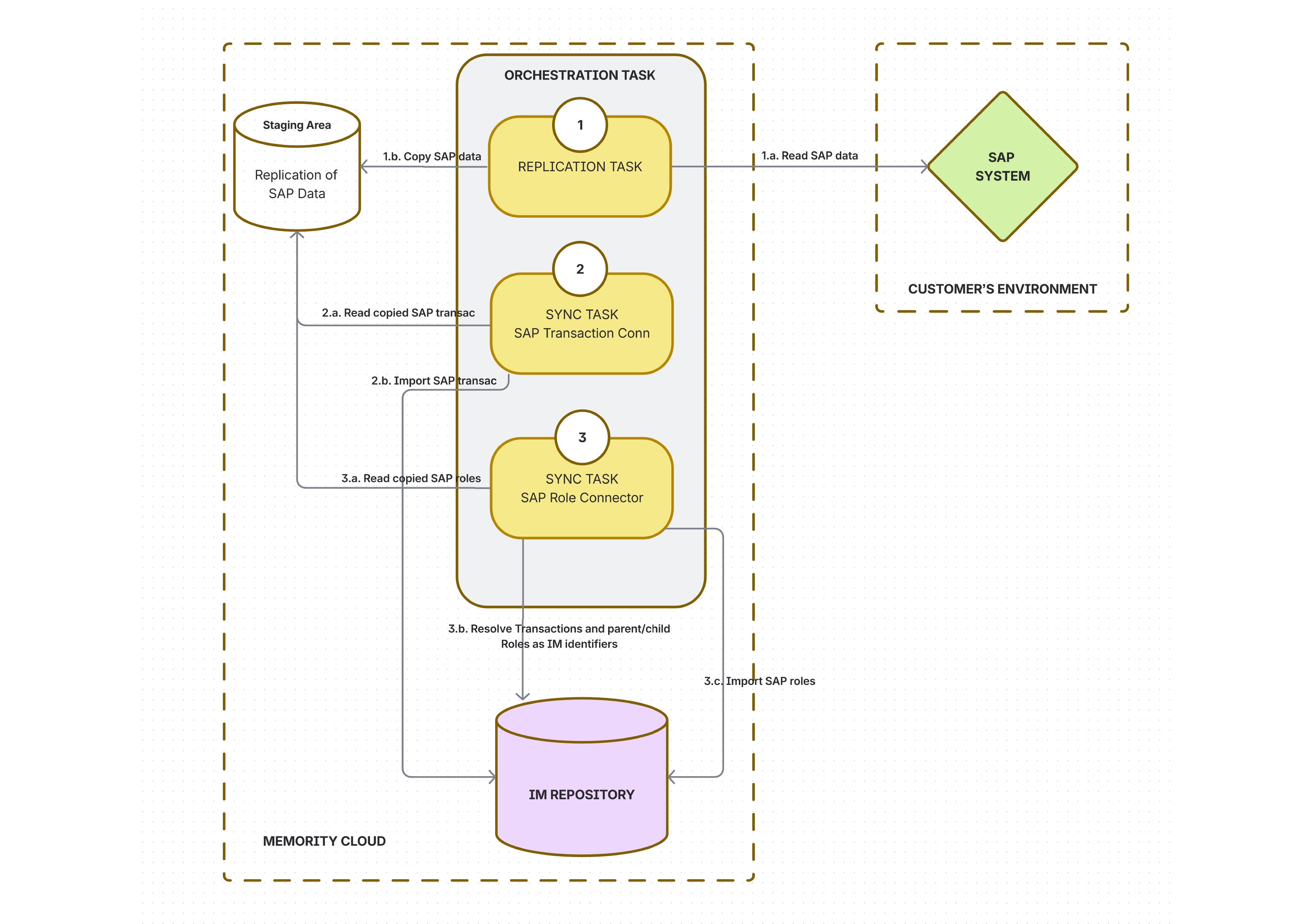
Configuring the SAP Role Connector
A sample XML configuration of SAP Role Connector is provided in https://memority.atlassian.net/wiki/spaces/HELP/pages/edit-v2/1308196873#Sample-Configuration.
ConnectorDefinition
To configure the SAP Role Connector, just declare a ConnectorDefinition (see Application Connector) with the following characteristics:
Connector class:
com.memority.domino.connector.sap.role.SapRoleConnectorConnector properties: see table below:
SAP Role ConnectorDefinition Properties | ||||
|---|---|---|---|---|
Property Name | Type | Mandatory | Description | Values (default in bold) |
| String | Yes | The identifier of the SAP system, which must match the one configured in the | N/A |
| Integer | No | The size of a page of SAP data fetched from the staging area | 5000 |

The multi-valued “referencingAttribute" Connector property is automatically set to "parent_role", "child_roles" when saving a ConnectorDefinition of type SAP Role, so that dependencies between Roles can be ordered when importing SAP Roles into Memority. Role dependencies are detailed below.
Handling References to Parent/Child Roles and Transactions
A given SAP Role may reference:
a “parent” Role, if the SAP Role is a "derived” role
“simple child Roles”, if the SAP Role is a “composite” role
transactions, if the SAP Role grants the usage of transactions
When SAP Roles are imported into Memority, those references are resolved as IM identifiers:
of kind
ROLEfor parent and child rolesof kind
RESOURCEfor transactions
This means that:
SAP Transactions must be imported before SAP Roles, as outlined in https://memority.atlassian.net/wiki/spaces/HELP/pages/edit-v2/1308196873#Overview
SAP Roles must be imported in the correct order, according to their parent/child dependency graph
The SynchronizationTaskDefinition used to launch the import of SAP Roles must thus be configured with sortInputDataset to true, to ensure the correct ordering of roles.
Using the SAP Role Connector
The SAP Role Connector imports SAP transactions as IM Roles. When defining usual import configuration elements, such as a SynchronizationTaskDefinition, The class of Transaction objects is fixed to sapRole. This is illustrated in the provided https://memority.atlassian.net/wiki/spaces/HELP/pages/edit-v2/1308196873#Sample-Configuration .
IM Attribute Mappings
The built-in SAP Role Connector maps SAP Role properties to IM attributes.
SAP Role properties are primarily found in the AGR_DEFINE SAP table.
Default IM attribute mappings and all SAP Role properties exposed by the Connector are listed below.
Default IM attribute mappings may be overridden in the Application configuration, and additional mappings targeting other IM attributes may be also configured.
IM attributes whose identifier starts with sap_ are “protected”, they cannot be updated nor deleted.
IM Attribute | Connector Attribute | IM Type | Mandatory | Multivalued | Description |
|---|---|---|---|---|---|
sap_roleName | role_name | String | Yes | No | The SAP Role identifier |
sap_roleDescriptionEn | description_e | String | No | No | The English description of the SAP Role |
sap_roleDescriptionFr | description_f | String | No | No | The French description of the SAP Role |
sap_roleCreatedAt/A | created_at | datetime | No | No | When the SAP Role was created |
sap_roleCreatedBy | create_usr | String | No | No | Who created the SAP Role |
sap_roleUpdatedAt | updated_at | datetime | No | No | When the SAP Role was updated |
sap_roleUpdatedBy | update_usr | String | No | No | Who updated the SAP Role |
sap_parentRole | parent_role | role_ref | No | No | If the SAP Role is a "derived role", this field identifies its parent role. |
sap_roleTransactions | transactions | resource_ref | No | Yes | The IDM |
sap_childRoles | child_roles | role_ref | No | Yes | This list pertains to composite SAP Roles only. This is the list of simple roles contained in the composite role. This list is not defined for simple roles |
sap_roleAttributes | attributes | String | No | No | A container for metadata that defines how the role behaves within the system. The data in this field is not human-readable. It contains a string of attributes that the SAP kernel parses to determine if the role needs special handling |
Sample Configuration
This section shows a sample configuration to import SAP Roles as IM Roles.
Note that:
shadow kind is set to
ROLEobject class is set to
sapRole
The related SapReplicationTaskDefinition, OrchestrationTaskDefinition and SAP Transaction import configuration have not been represented here, as this sample configuration focuses on SAP Roles.
  <dmn:ConnectorDefinition xmlns:dmn="http://www.memority.com/domino_sync/1_0"
                         id="sync-sap-connector">
    <name>sync-sap-connector</name>
    <description/>
    <connectorProperties>
        <connectorProperty>
            <name>sapInstanceId</name>
            <value>SAP01</value>
        </connectorProperty>
        <connectorProperty>
            <name>pageSize</name>
            <value>2000</value>
        </connectorProperty>
    </connectorProperties>
    <connectorMetadata>
        <connectorRef>
            <connectorName>com.memority.domino.connector.sap.role.SapRoleConnector</connectorName>
        </connectorRef>
    </connectorMetadata>
    <provisioningGroup>3</provisioningGroup>
</dmn:ConnectorDefinition>


   <dmn:Application id="sample_sap_role_app">
      <name>Sample SAP Role App</name>
      <connectorId>sample_sap_role_connector</connectorId>
      <schemaMappingDefinition>
         <objectSchemaMappingDefinitions>
            <objectSchemaMappingDefinition>
               <shadowKind>ROLE</shadowKind>
               <objectClassId>
                  <value>sapRole</value>
               </objectClassId>
               <inboundAttributesMappingDefinitions>
                  <attributeMappingDefinitions/>
               </inboundAttributesMappingDefinitions>
            </objectSchemaMappingDefinition>
         </objectSchemaMappingDefinitions>
      </schemaMappingDefinition>
      <synchronizationDefinition>
         <objectSynchronizationDefinitions>
            <objectSynchronizationDefinition>
               <shadowKind>ROLE</shadowKind>
               <objectClassId>
                  <value>sapRole</value>
               </objectClassId>
               <correlationDefinition>
                  <simpleCorrelationStrategyDefinition>
                     <attributeCorrelationDefinitions>
                        <attributeCorrelationDefinition>
                           <inputAttributeId>role_name</inputAttributeId>
                           <idmAttributeId>sap_RoleName</idmAttributeId>
                        </attributeCorrelationDefinition>
                     </attributeCorrelationDefinitions>
                  </simpleCorrelationStrategyDefinition>
               </correlationDefinition>
               <enabled>true</enabled>
               <reactionDefinitions>
                  <reactionDefinition>
                     <actions>
                        <action>SYNCHRONIZE_IDM_OBJECT</action>
                     </actions>
                     <name>React to 'linked'</name>
                     <situation>LINKED</situation>
                  </reactionDefinition>
                  <reactionDefinition>
                     <actions>
                        <action>SYNCHRONIZE_IDM_OBJECT</action>
                        <action>LINK</action>
                     </actions>
                     <name>React to 'unlinked'</name>
                     <situation>UNLINKED</situation>
                  </reactionDefinition>
                  <reactionDefinition>
                     <actions>
                        <action>UNLINK</action>
                     </actions>
                     <name>React to 'deleted'</name>
                     <situation>DELETED</situation>
                  </reactionDefinition>
                  <reactionDefinition>
                     <actions>
                        <action>ADD_IDM_OBJECT</action>
                     </actions>
                     <name>React to 'unmatched'</name>
                     <situation>UNMATCHED</situation>
                  </reactionDefinition>
                  <reactionDefinition>
                     <actions>
                        <action>DELETE_APPLICATION_OBJECT</action>
                     </actions>
                     <name>React to 'disputed'</name>
                     <situation>DISPUTED</situation>
                  </reactionDefinition>
               </reactionDefinitions>
            </objectSynchronizationDefinition>
         </objectSynchronizationDefinitions>
         <objectTypeResolutionDefinition>
            <defaultObjectTypeId>saprole</defaultObjectTypeId>
         </objectTypeResolutionDefinition>
      </synchronizationDefinition>
   </dmn:Application>

   <dmn:SynchronizationTaskDefinition id="sample_sap_role_sync_task">
      <taskType>IMPORT</taskType>
      <shadowKind>ROLE</shadowKind>
      <objectClassId>sapRole</objectClassId>
      <applicationId>sample_sap_role_app</applicationId>
      <sortInputData>true</sortInputData>
   </dmn:SynchronizationTaskDefinition>