
Self-Driven Dashboard Widget
Definition
The Self-Driven Dashboard Widget can be used to display and organize reporting items. These items consists of cards that can be added, removed and moved in the dashboard to present information. Those items can be scoped to specific criteria in order to present a synthetic view of a full report.
Configuration
The widget can be declared in any type of Feature but will most likely be more appropriate in a UI_FOR_OBJECT feature, configured as the home page of users.
Properties
Property name | Type | Mandatory | Description | Values (default value in bold) |
|---|---|---|---|---|
items |
| YES | A list of dashboard items. These items represent what the user can add to its dashboard. Note that the item might be filtered if it references something the user has no access to. | - |
initialItems |
| NO | A list of initial items id, presented when the user arrive on the dashboard for the first time. The id values must match the id of the items present in the “items” list. These initial items will be inserted from left to right in the declared order, respecting their width and height. | - |
DashboardItem
Property name | Type | Mandatory | Description | Values (default value in bold) |
|---|---|---|---|---|
id |
| YES | A (unique) id of this item. This id is used in i18n keys, in the preference storage and to reference the initial items. Pick a descriptive name such as “last-authentication-24h”. | - |
widgets |
| NO |
Mutually exclusive with the property “builtin”. A list of Memority widgets. These widgets will constitute the dashboard item and be displayed. The most common usage will be a unique | - |
builtin |
| NO |
Mutually exclusive with the property “widgets”. Can reference well known builtin dashboard items.
| - |
options |
| NO | Options for the dashboard item. See below. | Default options (see below) |

DashboardItemOptions
Property name | Type | Mandatory | Description | Values (default value in bold) |
|---|---|---|---|---|
actions |
| NO | A list of action buttons to be displayed in the dashboard item (like links) | - |
linkTarget |
| NO | For builtin item, if it support a builtin redirection (such as clicking on user tasks cards), specify if the redirection happen in the same tab or a new one.
| NEW_TAB |
layout |
| NO | When the “widgets” property of the DashboardItem contains more than one widget, specify the layout.
| VERTICAL |
width |
| NO | The item width in relative unit from 1 to 12. The dashboard uses a 12 column layout. Exemple: two items of equal width on one row will both have width = 6. For a full width item use width = 12. | 6 |
height |
| NO | The item height in relative unit (10px per unit) | 50 |
I18N
The dashboard elements follow an i18n conventions for translations:
Key | Description |
|---|---|
| The name of the item in the “add widget” modal |
| The description of the item in the “add widget” modal |
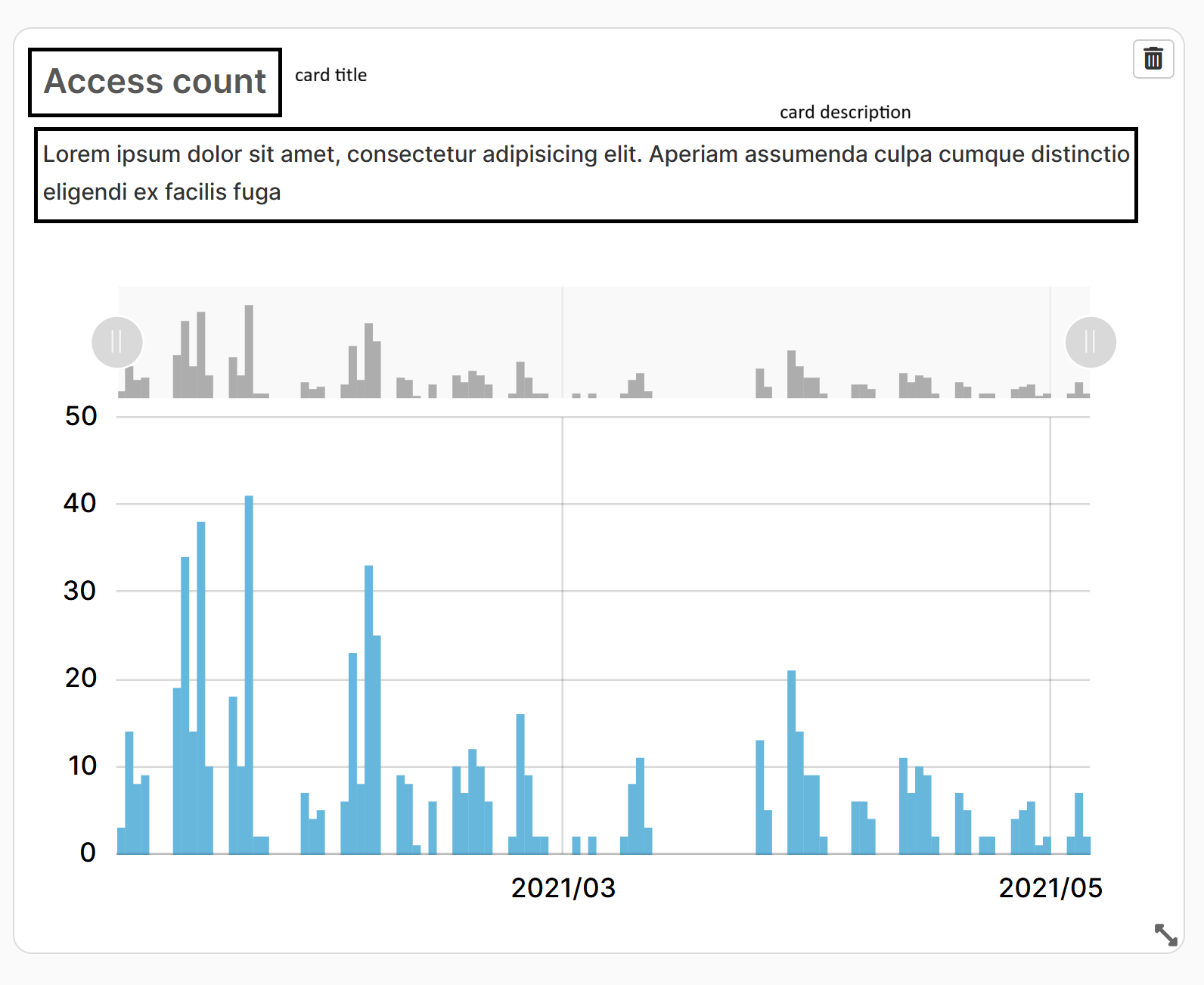
| The card title. If not configured no title is displayed |
| The card descriptio. If not configured no description is displayed. |
Scoping with approaches
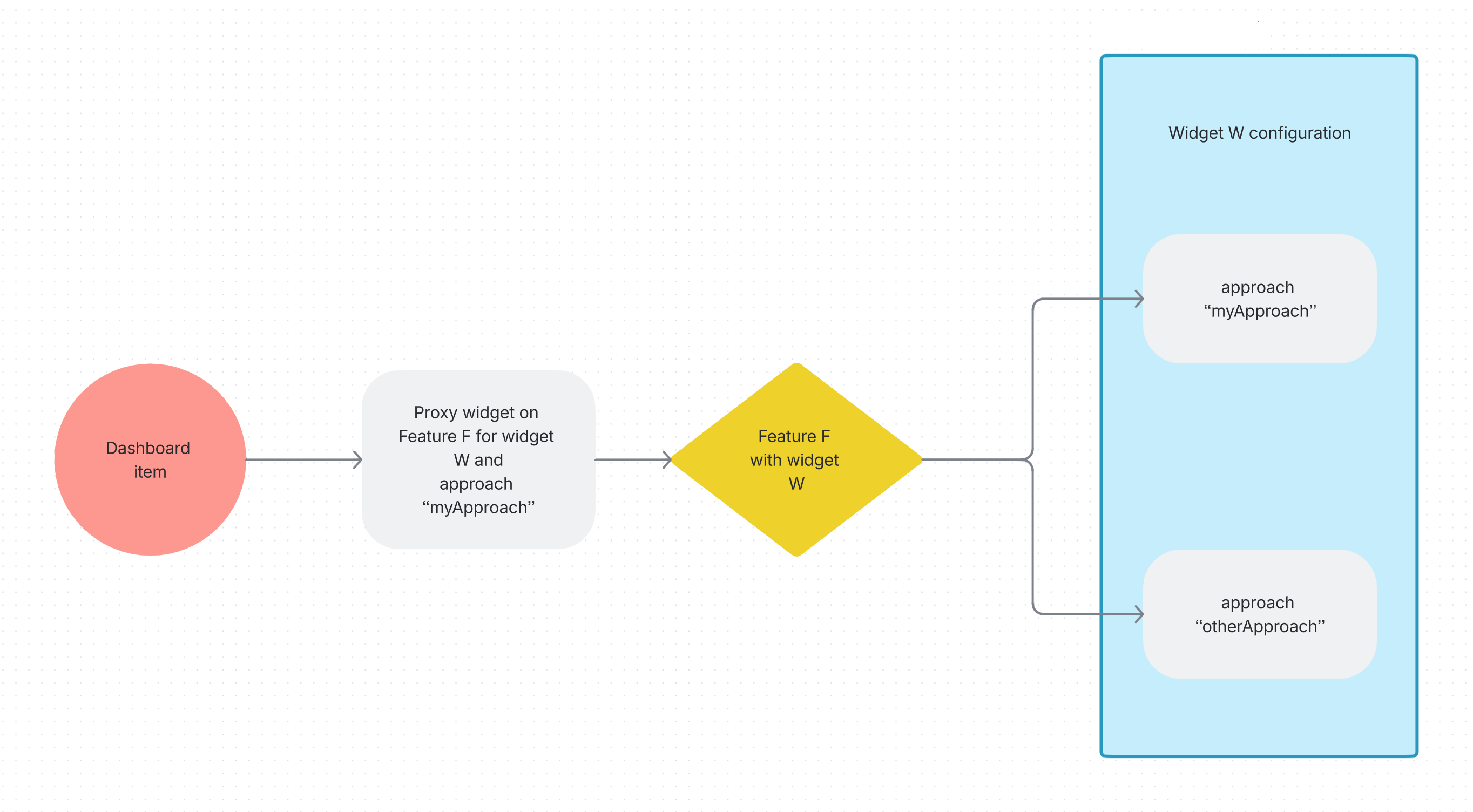
Dashboard items will in most cases reference ProxyWidget on which a specific set of options can be applied. These options are called “approaches” on these widgets, allowing for instance to:
Override the criteria of a reporting widget with fixed values
Display specific columns on reporting lists
An approach is always defined as such:
Property | Description |
|---|---|
id | The id of the approach |
value | The value of the approach. This object depends on the widget being targeted. |
To summarize, a dashboard will most likely work in this way:
Reporting Widgets Approach
An approach on reporting widgets is defined in the “approaches” property as a list of “approach” defined as
Property | ||
|---|---|---|
id | String | The id of the approach which can be referenced in a proxy widget. |
value | ReportingApproach | The configuration of the approach |
To configure specific behaviors on a reporting widget, one can declare approaches on the original reporting widget and reference the approach in a proxy widget declared as a dashboard item.
Reporting Widget approach definition
Property | Description |
|---|---|
criteria | A list of criteria values which allows to scope the request when this widget is accessed through a proxy widget referencing this approach
XML
|
action | An action button which can act as a primary link when clicking the widget. This will only apply to reporting widgets such as counter. When defined, clicking the counter referenced through a proxy widget in the dashboard will trigger this action. In the exemple below it will open the target link in a new tab.
XML
|
Example for scoped criteria
<!-- In the dashboard widget, declare a proxy widget with approach "first" on the target widget -->
<items>
    <item id="reporting-1">
        <widgets>
            <widget id="proxy-reporting-access-hours-widget" xsi:type="ctdbum:ProxyWidgetType">
                <hidden>false</hidden>
                <displayOptions>
                    <modalSize>SM</modalSize>
                </displayOptions>
                <config>
                    <bordered>false</bordered>
                    <title>true</title>
                    <featureId>test_reporting-access-hours</featureId>
                    <widgetId>reporting-access-hours-widget</widgetId>
                    <approach>first</approach>
                </config>
            </widget>
        </widgets>

<!-- In the test_reporting-access-hours Feature, in the reporting-access-hours-widget widget, define the "first" approach -->
<widget id="reporting-access-hours-widget" xsi:type="ctdbum:ReportingWidgetType">
   <hidden>false</hidden>
   <displayOptions>
      <modalSize>SM</modalSize>
   </displayOptions>
   <config>
      <bordered>false</bordered>
      <title>false</title>
      <approaches>
         <approach>
            <id>first</id>
            <value>
               <criteria>
                  <criterion>
                     <name>date</name>
                     <operator>BETWEEN</operator>
                     <value>P20Y</value>
                  </criterion>
               </criteria>
            </value>
         </approach>
      </approaches>
Example for triggering an action when clicking a counter chart
<!-- In the dashboard widget, declare a proxy widget with approach "first" on the target widget -->
<items>
    <item id="reporting-1">
        <widgets>
            <widget id="proxy-reporting-access-hours-widget" xsi:type="ctdbum:ProxyWidgetType">
                <hidden>false</hidden>
                <displayOptions>
                    <modalSize>SM</modalSize>
                </displayOptions>
                <config>
                    <bordered>false</bordered>
                    <title>true</title>
                    <featureId>test_reporting-counter</featureId>
                    <widgetId>reporting-counter-widget</widgetId>
                    <approach>first</approach>
                </config>
            </widget>
        </widgets>

<!-- In the test_reporting-counter Feature, in the reporting-counter-widget widget, define the "first" approach -->
<widget id="reporting-counter-widget" xsi:type="ctdbum:ReportingWidgetType">
   <hidden>false</hidden>
   <displayOptions>
      <modalSize>SM</modalSize>
   </displayOptions>
   <config>
      <bordered>false</bordered>
      <title>false</title>
      <approaches>
         <approach>
            <id>first</id>
            <value>
              <criteria>...</criteria>
               <action id="view-full-feature" xsi:type="ctdbum:ButtonWidgetType">
                  <hidden>false</hidden>
                  <config>
                     <authenticationLevelSufficient>false</authenticationLevelSufficient>
                     <borderless>false</borderless>
                     <circle>true</circle>
                     <color>blue</color>
                     <icon>fa fa-eye</icon>
                     <label>true</label>
                     <linkTarget>NEW_TAB</linkTarget>
                     <outline>true</outline>
                     <size>XS</size>
                     <target xsi:type="ctdbum:LinkTargetType">
                        <link>feature://test_reporting-counter</link>
                        <target>NEW_TAB</target>
                     </target>
                  </config>
               </action>
               <criteria/>
            </value>
         </approach>
      </approaches>
Reporting List Widget Scoping
To scope a reporting list widget, one can declare approaches on the reporting list widget and reference the approach in a proxy widget declared as a dashboard item.
Reporting List Widget approach value
Property | Description |
|---|---|
criteria | A list of criteria values.
XML
|
columns | The columns to display when proxied
XML
|
Example
<!-- In the dashboard widget, declare a proxy widget with approach "first" on the target widget -->
 <item id="reporting-2">
    <widgets>
       <widget id="proxy-reporting-access-hours-list-widget" xsi:type="ctdbum:ProxyWidgetType">
          <hidden>false</hidden>
          <displayOptions>
             <modalSize>SM</modalSize>
          </displayOptions>
          <config>
             <bordered>false</bordered>
             <title>true</title>
             <featureId>test_reporting-access-hours</featureId>
             <widgetId>reporting-access-hours-list-widget</widgetId>
             <approach>first</approach>
          </config>
       </widget>

<!-- In the test_reporting-access-hours Feature, in the reporting-access-hours-list-widget widget, define the "first" approach -->
<widget id="reporting-access-hours-list-widget" xsi:type="ctdbum:ReportingListWidgetType">
     <hidden>false</hidden>
     <displayOptions>
        <modalSize>SM</modalSize>
     </displayOptions>
     <config>
       ...
       <approaches>
         <approach>
            <id>first</id>
            <value>
               <columns>
                  <column>identity._id</column>
                  <column>ModuleName</column>
               </columns>
               <criteria>
                  <criterion>
                     <name>date</name>
                     <operator>BETWEEN</operator>
                     <value>P20Y</value>
                  </criterion>
               </criteria>
            </value>
         </approach>
      </approaches>
Example
<widget id="dashboard-widget" xsi:type="ctdbum:DashboardWidgetType">
<hidden>false</hidden>
<displayOptions>
<modalSize>LG</modalSize>
</displayOptions>
<config>
<bordered>false</bordered>
<title>true</title>
<items>
<item id="reporting-1">
<widgets>
<widget id="proxy-reporting-access-hours-widget" xsi:type="ctdbum:ProxyWidgetType">
<hidden>false</hidden>
<displayOptions>
<modalSize>SM</modalSize>
</displayOptions>
<config>
<bordered>false</bordered>
<title>true</title>
<featureId>test_reporting-access-hours</featureId>
<widgetId>reporting-access-hours-widget</widgetId>
<approach>first</approach>
</config>
</widget>
</widgets>
<options>
<actions>
<action id="reporting-access-hours-btn" xsi:type="ctdbum:ButtonWidgetType">
<hidden>false</hidden>
<config>
<authenticationLevelSufficient>false</authenticationLevelSufficient>
<borderless>false</borderless>
<circle>false</circle>
<icon>fa fa-chart-simple</icon>
<label>true</label>
<linkTarget>SELF</linkTarget>
<outline>true</outline>
<size>SM</size>
<target xsi:type="ctdbum:ModalTargetType">
<link>feature://test_reporting-access-hours</link>
<modalSize>SM</modalSize>
<onDismiss>NONE</onDismiss>
</target>
</config>
</action>
</actions>
<layout>VERTICAL</layout>
<linkTarget>NEW_TAB</linkTarget>
<height>500</height>
<width>12</width>
</options>
</item>
<item id="reporting-2">
<widgets>
<widget id="proxy-reporting-access-hours-list-widget" xsi:type="ctdbum:ProxyWidgetType">
<hidden>false</hidden>
<displayOptions>
<modalSize>SM</modalSize>
</displayOptions>
<config>
<bordered>false</bordered>
<title>true</title>
<featureId>test_reporting-access-hours</featureId>
<widgetId>reporting-access-hours-list-widget</widgetId>
<approach>first</approach>
</config>
</widget>
</widgets>
<options>
<actions/>
<layout>VERTICAL</layout>
<linkTarget>NEW_TAB</linkTarget>
<height>050</height>
<width>6</width>
</options>
</item>
<item id="reporting-3">
<widgets>
<widget id="proxy-reporting-pie-chart-widget" xsi:type="ctdbum:ProxyWidgetType">
<hidden>false</hidden>
<displayOptions>
<modalSize>SM</modalSize>
</displayOptions>
<config>
<bordered>false</bordered>
<title>true</title>
<featureId>test_reporting-chart-association</featureId>
<widgetId>reporting-pie-chart-widget</widgetId>
</config>
</widget>
</widgets>
<options>
<actions/>
<layout>VERTICAL</layout>
<linkTarget>NEW_TAB</linkTarget>
<height>50</height>
<width>6</width>
</options>
</item>
<item id="reporting-4">
<widgets>
<widget id="proxy-reporting-map-widget" xsi:type="ctdbum:ProxyWidgetType">
<hidden>false</hidden>
<displayOptions>
<modalSize>SM</modalSize>
</displayOptions>
<config>
<bordered>false</bordered>
<title>true</title>
<featureId>test_reporting-map</featureId>
<widgetId>reporting-map-widget</widgetId>
</config>
</widget>
</widgets>
<options>
<actions/>
<layout>VERTICAL</layout>
<linkTarget>NEW_TAB</linkTarget>
<height>50</height>
<width>6</width>
</options>
</item>
<item id="reporting-5">
<widgets>
<widget id="proxy-reporting-radar-widget" xsi:type="ctdbum:ProxyWidgetType">
<hidden>false</hidden>
<displayOptions>
<modalSize>SM</modalSize>
</displayOptions>
<config>
<bordered>false</bordered>
<title>true</title>
<featureId>test_reporting-radar-access-hours</featureId>
<widgetId>reporting-access-hours-widget</widgetId>
</config>
</widget>
</widgets>
<options>
<actions/>
<layout>VERTICAL</layout>
<linkTarget>NEW_TAB</linkTarget>
<height>50</height>
<width>6</width>
</options>
</item>
<item id="reporting-6">
<widgets>
<widget id="proxy-reporting-counter-widget" xsi:type="ctdbum:ProxyWidgetType">
<hidden>false</hidden>
<displayOptions>
<modalSize>SM</modalSize>
</displayOptions>
<config>
<bordered>false</bordered>
<title>true</title>
<featureId>test_reporting-counter</featureId>
<widgetId>reporting-authentication-counter-widget-2</widgetId>
</config>
</widget>
</widgets>
<options>
<actions/>
<layout>VERTICAL</layout>
<linkTarget>NEW_TAB</linkTarget>
<height>50</height>
<width>6</width>
</options>
</item>
<item id="reporting-7">
<widgets>
<widget id="proxy-reporting-timeline-widget" xsi:type="ctdbum:ProxyWidgetType">
<hidden>false</hidden>
<displayOptions>
<modalSize>SM</modalSize>
</displayOptions>
<config>
<bordered>false</bordered>
<title>true</title>
<featureId>test_reporting-timeline</featureId>
<widgetId>reporting-timeline-widget</widgetId>
<approach>first</approach>
</config>
</widget>
</widgets>
<options>
<actions/>
<layout>VERTICAL</layout>
<linkTarget>NEW_TAB</linkTarget>
<height>50</height>
<width>6</width>
</options>
</item>
<item id="reporting-8">
<widgets/>
<builtin>USER_TASKS</builtin>
<options>
<actions/>
<layout>VERTICAL</layout>
<linkTarget>NEW_TAB</linkTarget>
<height>13</height>
<width>2</width>
</options>
</item>
<item id="reporting-9">
<widgets/>
<builtin>SECONDARY_CANDIDATE_USER_TASKS</builtin>
<options>
<actions/>
<layout>VERTICAL</layout>
<linkTarget>NEW_TAB</linkTarget>
<height>13</height>
<width>2</width>
</options>
</item>
<item id="reporting-10">
<widgets/>
<builtin>ADMIN_USER_TASKS</builtin>
<options>
<actions/>
<layout>VERTICAL</layout>
<linkTarget>NEW_TAB</linkTarget>
<height>13</height>
<width>2</width>
</options>
</item>
<item id="reporting-11">
<widgets/>
<builtin>TECHNICAL_ADMIN_USER_TASKS</builtin>
<options>
<actions/>
<layout>VERTICAL</layout>
<linkTarget>NEW_TAB</linkTarget>
<height>13</height>
<width>2</width>
</options>
</item>
<item id="reporting-12">
<widgets/>
<builtin>SUBMITTED_REQUESTS</builtin>
<options>
<actions/>
<layout>VERTICAL</layout>
<linkTarget>NEW_TAB</linkTarget>
<height>13</height>
<width>2</width>
</options>
</item>
<item id="reporting-13">
<widgets/>
<builtin>ABOUT_ME_REQUESTS</builtin>
<options>
<actions/>
<layout>VERTICAL</layout>
<linkTarget>NEW_TAB</linkTarget>
<height>13</height>
<width>2</width>
</options>
</item>
</items>
<initialItems>
<item>reporting-7</item>
<item>reporting-6</item>
<item>reporting-5</item>
<item>reporting-2</item>
<item>reporting-3</item>
<item>reporting-1</item>
<item>reporting-4</item>
</initialItems>
</config>
</widget>