
Object Types
Definition
An Object Type allows to define the types of Object that will be managed in the Memority Portal application and used in Features, rules etc...
There are five types of Objects:

Before configuring an Object Type, it is recommended to configured Attributes.
By Default, When the Memority environment is created, we propose some standard attributes definition, that can be customized according to the needs. Therefore if the existing attributes definition are sufficient to configure the client's data model, it is not mandatory to create new ones.
There are specific built-in and meta Attributes for each Object Type. It is therefore not necessary to create these Attributes manually.
Configuration
You can access the Object Types configuration :
by clicking on "Data Model" → The Object Type
by clicking on "System" → "Configurations" → "Data Model" and perform an import/export.
Mandatory properties
Property name | Type | Description |
|---|---|---|
id |
| The unique identifier of an Object Type that will be reused in the configuration (Features etc...) |
name |
| The Object Type name. It can be different from the identifier. |
idGenerationRule |
| Defines how the identifier of the Object Type will be generated if no identifier has been provided. The rule can be implemented either by Random Identifier Generator or by Groovy Script. |
Optional requirements
Property name | Type | Description | Values (default value in bold) |
|---|---|---|---|
description |
| The purpose of the Object Type. | - |
idGenerationRetryNb |
| Defines how many times the generation of identifier can be done. It can be useful when the random identifier rule has been selected in order to give more chance to find non already existing ID for a new identity. | 0, 1, 2, 3... |
| Use to validate the value of the Object Type and verify the integrity of the whole identity with their specifics constraints. If this rule is not respected, the creation or the modification of the Object Type is rejected with an error message. | - |
Associate an Attribute to an Object Type
Attribute Binding is the link between an Object Type and an Attribute Definition. For instance, given a type “employee” we can bind it the attribute “firstName”. This means that instances of employees will have an attribute called “firstName” as part of their definition.
It is mandatory to associate at least one Attribute to an Object Type.
Steps | Preview | |
|---|---|---|
| 1 | Access the drop-down list. | 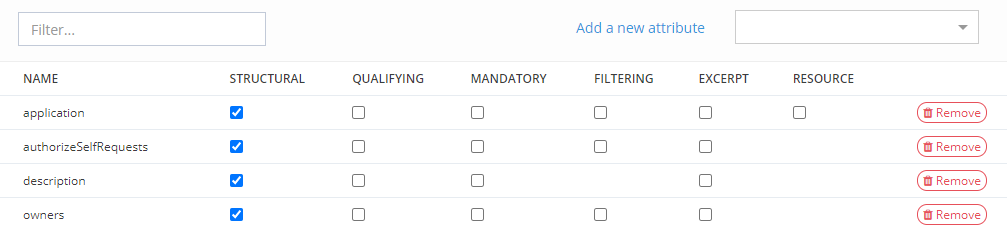 |
| 2 | Choose one or more Attributes. |
Properties
Attribute binding can be configured with different modifiers such as:
Structural : attributes shared by objects having the same "entity_id" (siblings)
Qualifying: whether or not if the Attribute is systematically sent to external applications
Mandatory : when creating or updating an instance of the Object Type, it is mandatory to provide a value for this attribute
Filtering : the attribute value can be used when searching objects of this type
Excerpt : when asking for a short representation of the object
Details about each property is available in the following table :
Property name | Description | Values (default value in bold) | Good to know |
|---|---|---|---|
structural |
| true, false | A structural Attribute is common to all siblings of an Object instance. |
qualifying | Indicates whether or not if the Attribute is systematically sent to external applications. Qualifying value concern Attributes whose values will always be provided in AMQP domain events. Those Attributes are typically important either for the reporting or for correlation purposes in downstream consumers. | true, false | A qualifying Attribute will be part of the Object part of Json sent message. |
mandatory | Indicates whether or not the Attribute is mandatory for Managed Object instances of this Object Type. | true, false | A mandatory Attribute will be checked at creation/update of a managed Object instance. |
filtered | Indicates whether or not the Attribute can be used when searching Managed Object instances of this Object Type. | true, false | Can be ticked only if the Attribute:
|
excerpt | An Attribute ticked "excerpt" will be systematically displayed in the pop-up of an Object Reference for the concerned Object Type. It can be used also to display an Object Reference as excerpt on result search (on a search/bulk Feature). If an Attribute is checked as excerpt, this is valid for the whole application. To display the exceprt, an i18n translation must be added: either with a key of this model (ui.model."objectType"."ui.model."objectType"."idofthetype".excerpt".excerpt), or directly in the translation part of an object type. | true, false | The Object Reference widget already includes kind, type, id, entity id, status and enabled. Example: the lastName and country Attributes are checked excerpt. 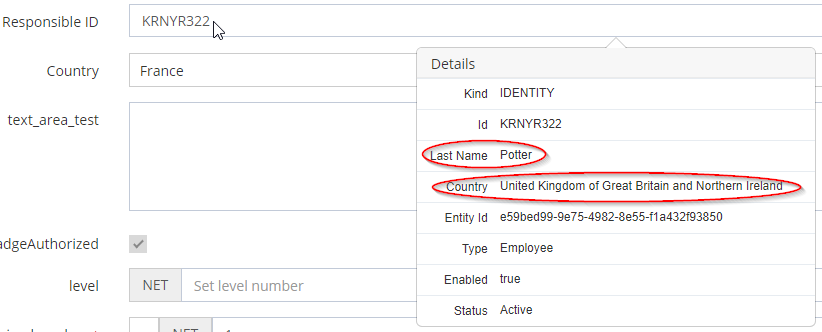 |
resource (only for Role Type) | Allows to display Resource (computed) information in Role dashboard (by clicking on the "Action" button). This Attribute must be :
| true, false | Only one Attribute can be checked as resource per Role Type. |

Siblings
"Siblings" are identities who share the same entityId. When identities have the same entityId, their structural attributes values are synchronized to be equal. This is an answer to a category of problems where a single individual in the organization should have multiple identities (different roles in the company where a clear separation of identity is desired) but where some common attributes of these identities should be kept in sync (such as its firstname, lastname, address etc.) in order to avoid the cumbersome requirement of synchronizing each changes to the identities manually.
Behaviors
Downward propagation: The identity receives the structural attributes values from its siblings
Upward propagation: The identity transfers its structural attributes values to its siblings
Note that when we talk about an attribute “value”, an absence of value is still considered a value. Therefore, when a sibling has no value for a structural attribute, this null value is still propagated.
Creation: When an identity is created with the same entityId as existing siblings, it will receive the structural attributes values of its siblings (downward propagation). Note that if the identity is created with structural attributes values different than those of its siblings, they will get overriden (including null values on the siblings).
Patch: When an identity is already a sibling of other identities (same entityId) and is patched on a structural attribute, this new value is propagated to its siblings (upward propagation). If the pach contains the entityId itself, causing the identity to become a sibling, the identity will first be synchronized with its new siblings and the patch will apply thereafter, potentiallly causing an upward propagation.
Object Lifecycle Policy: However, when an identity entityId is changed in an Object Lifecycle Policy, causing the identity to become a sibling of some identities, the propagation will not be an upward propagation but a downward propagation, i.e this identity structural attributes will receive the existing values of its current siblings. Since lifecycle policies applies post patch, the consequence is that any patch targeting structural attributes on an identity subjected to such lifecycle policy will be overriden, i.e if one were to patch the firstName (structural) of an identity with value “John” where a lifecycle policy is attaching this identity as a sibling of “Arthur”, the patch of the firstName will not apply since the identity will be instead put in conformity with its sibling (it will receive the firstName “Arthur”). Non structural attributes patch will however apply normally.
Note that the upward propagation has only a depth of one (to avoid an infinite loop where patching a sibling will trigger patches of its siblings which will trigger patches again etc.). This means that if an Object Lifecycle Policy modifies structural attributes, some care must be taken in the policy condition to avoid running this change again during the upward propagation to other siblings since there won’t be additional propagation.
Read next
- Features
Design screens and business features to manage objects.